Indiramma Illu Mobile App 2026: Apply Online & Check Status?
The Indiramma Illu scheme is a housing support program by the Telangana government. It helps eligible poor and homeless families build a permanent house. Many people are now searching for the Indiramma Illu Mobile App 2026 to apply online or check their application status. But here is the simple truth: the official mobile app is mainly used by government staff for surveys, geo-tagging, photos, and construction progress updates.
For citizens, the easiest way to check status is through the official Indiramma Indlu portal. Learn how to use the Indiramma Illu Mobile App and official portal in 2026 Check application status, beneficiary list, eligibility, documents, and simple tips.

What Is Indiramma Illu Scheme?
Indiramma Illu, also called Indiramma Indlu, is a Telangana housing scheme. Under this scheme, eligible beneficiaries can get financial help to build a house.
The scheme mainly supports:
Homeless families
Poor and economically weaker families
Families living in temporary houses
Eligible Telangana residents
People who do not own a proper house
The financial assistance is generally ₹5 lakh for eligible beneficiaries.
What Is the Indiramma Illu Mobile App?
The Indiramma Indlu mobile app is an official app linked to the Telangana housing scheme. But it is important to understand this:
The app is mostly used by officials for scheme implementation. It helps them:
So, if you are a normal applicant, you may not need the app for checking your status. You can use the official website instead.

Can Citizens Apply Through the Indiramma Illu Mobile App?
At present, the app is mainly for officials. Citizens should use the official portal or contact local government offices for application-related help.
You can check your status online using:
How to Check Indiramma Illu Status Online 2026
Follow these simple steps:
Go to the official Indiramma Indlu website.
Find the Application Search option.
Select how you want to search.
Enter your Aadhaar number, mobile number, application ID, or FSC card number.
Click on the search/submit button.
Your application details will appear on the screen.
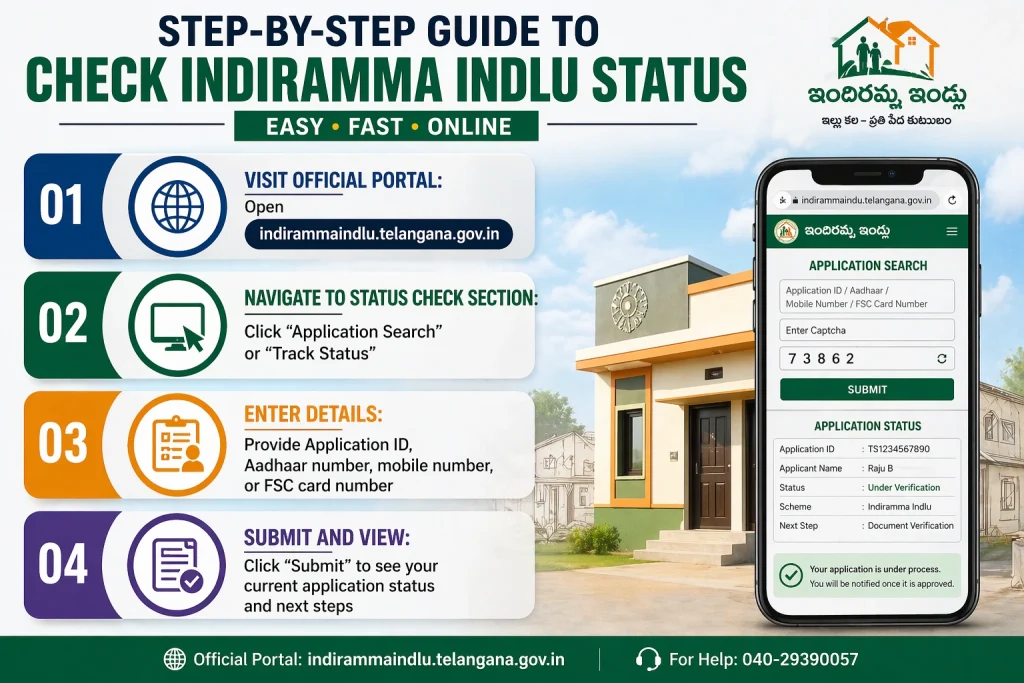
You may see details like:
Indiramma Illu Application Status Meaning
When you check your status, you may see different results. Here is what they usually mean:
Pending: Your application is still under review.
Under Verification: Officials may be checking your documents or visiting your location.
Eligible: Your details match the scheme rules.
Sanctioned: Your name has been approved for housing assistance.
Rejected: Your application was not approved. You should check the reason and contact the local office.
Documents Needed for Indiramma Illu Scheme
Keep these documents ready:
Who Is Eligible for Indiramma Illu?
You may be eligible if:
You are a resident of Telangana
You belong to a poor or weaker section
You do not own a permanent house
You have valid documents
Your family details match government records
You meet local verification rules
Final approval depends on government verification.
How to Download Indiramma Illu App
If you are an official or asked to use the app, you can search for INDIRAMMA INDLU on Google Play Store.
Before downloading, check:
Important Tips for Applicants
Use the same mobile number that you gave during application.
Enter Aadhaar or application ID carefully. Even one wrong digit can show no result.
Do not share OTP, Aadhaar details, or bank details with unknown people.
Always use the official website for status checking.
If your status is pending for a long time, visit your Gram Panchayat, municipal office, or housing office.
Take a screenshot of your status for future use.
Common Problems While Checking Status
No record found: Your details may be wrong, or your application may not be updated yet.
Server error: Try again later. Government websites can be slow during high traffic.
Wrong details shown: Contact your local housing office.
Status pending: Wait for verification or check with local officials.
Indiramma Illu Helpline
For help, use the helpline number shown on the official Indiramma Indlu portal. You can also visit your nearest Gram Panchayat, municipal office, or district housing office.
FAQs About Indiramma Illu Mobile App
Final Words
The Indiramma Illu Mobile App 2026 is useful for official survey and monitoring work. But for most citizens, the best way to check application status is through the official Indiramma Indlu website.
Use your Aadhaar number, mobile number, application ID, or FSC card number to check your status. Keep your documents ready and follow updates only from official sources.